
How to Configure Your Email with Flowbox?
A Guide On How to Configure your Email Setting with Flowbox.
With Flowbox, you have the option to customize the email that is being sent on your behalf. By default, emails are sent from info@flowbox.reviews, but you can easily configure the email to your liking.
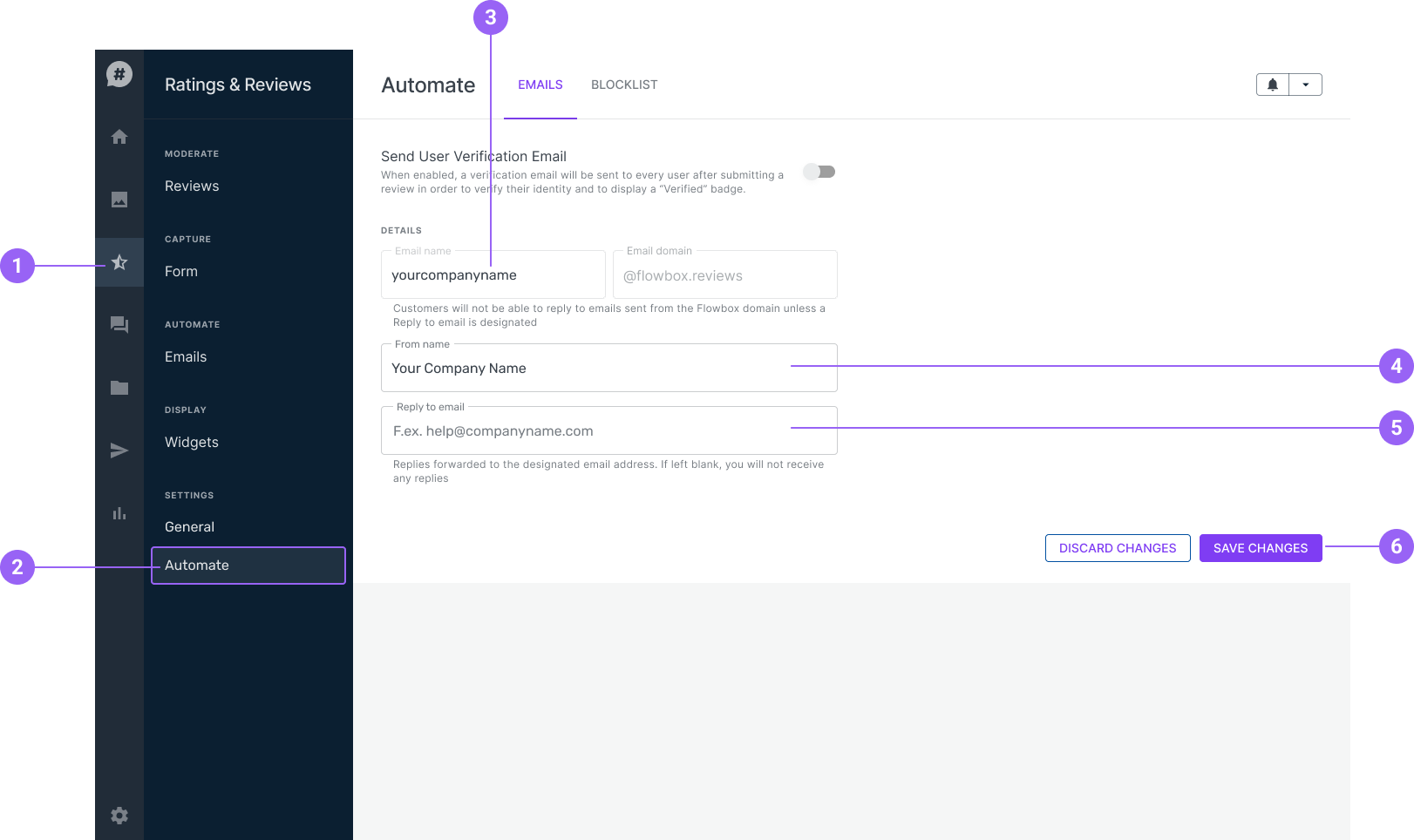
Login to your Flowbox Account.
STEP 1: Go to 'Ratings & Reviews'.
STEP 2: Click 'Automate' under settings.
STEP 3: ( optional ) Type in your Email Name e.g yourcompanyname@flowbox.reviews
STEP 4: ( optional ) Type in your From Name e.g Your Company Name
STEP 5: ( optional ) Type in the Reply to Email.
STEP 6: Click 'Save Changes'.
Flowbox emails are designed to be "no reply" emails, meaning that if customers try to reply to the email, they will receive a delivery error message stating that the address is not found. To ensure that your customers are able to get in touch with you easily, we recommend setting up a "Reply to email" address so that they can easily reach out with any questions or concerns.