Publish to X / Twitter from Flowbox
This article shows you how to schedule and publish content to Twitter
Flowbox supports X (Twitter) collection, customization and publishing. This article covers all the Flowbox features available for creating and publishing Tweet posts on X.
How to create a Twitter post in Flowbox
- Click on the ‘Publish’ icon in the navigation bar.
- A calendar will display all your scheduled posts, including those already created and published.
- Click the ‘Create post’ button in the top-right corner.
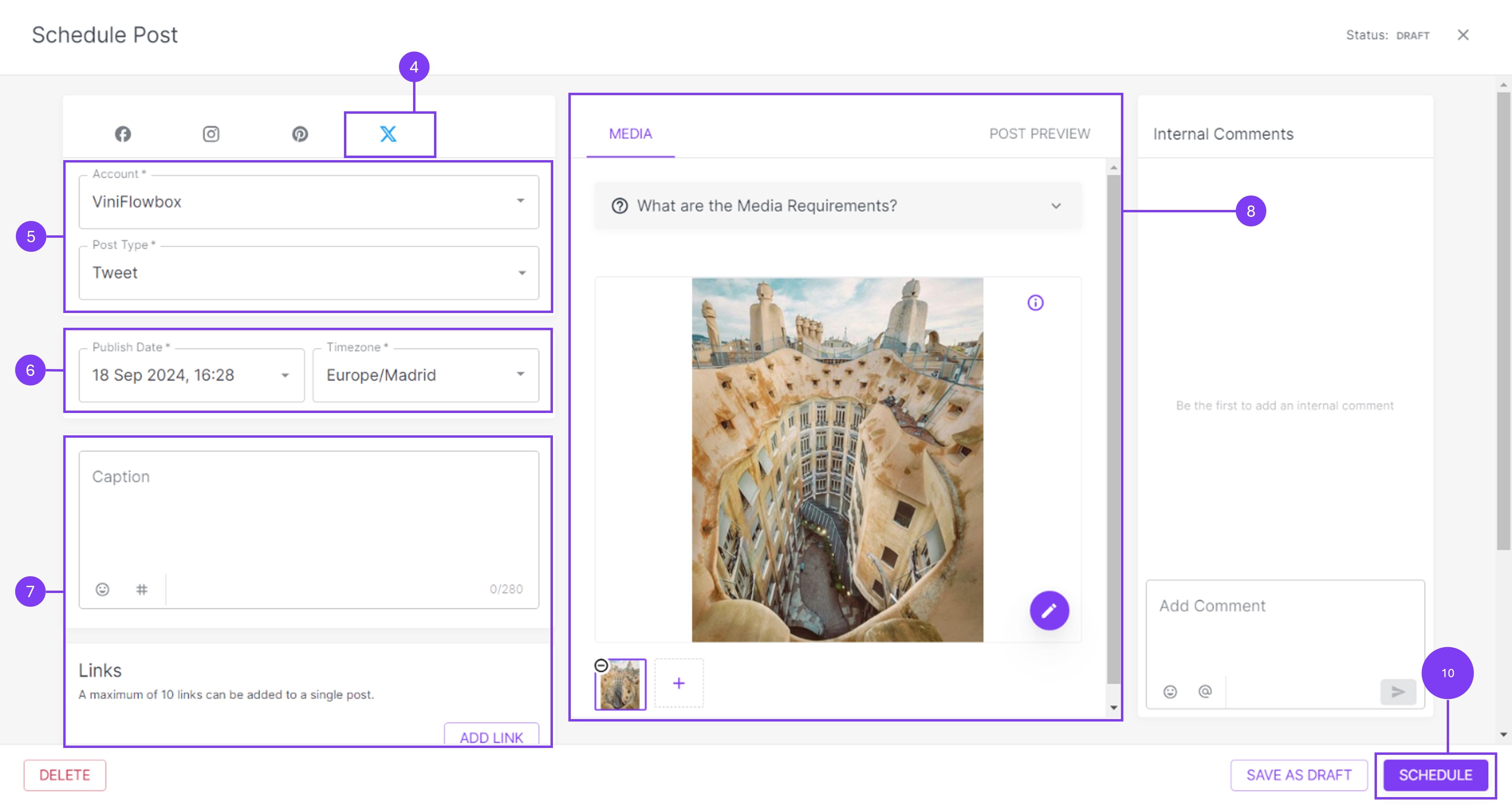
- Click the X icon in the top bar.
- Choose the X / Twitter account where you want to publish the content and the post type (Tweet).
- Select a date and time for your post
- Optionally, you give your post a nice caption and add up to 10 links.
- In the middle section, upload the video or image you want to publish. You can also use the post preview tab to see how your content will look once posted.
- In the right section, you can add comments that are only visible within the Flowbox platform.
- When you're done, click on the blue 'Schedule' button.
- Your post is now scheduled and will be published at the time you selected.